


Wholesome Yum
4.7154.00 Reviews
App Specs
- Version
- 2.23.7
- Updated On
- License
- Free
- Downloads
- 10,000+
- Developer
- Wholesome Yum
- Categories
- Food & Drink
- Platform
- Android
Screenshots


 Analysis by AppCompare
I like the idea of a recipe app most when it helps me make a decision at the exact moment I might otherwise give up and order something familiar. Wholesome Yum is aimed at that practical gap: finding a meal that fits a lower-carb way of eating, then turning the choice into a plan for cooking and shopping. It is a free Food & Drink app from Wholesome Yum, with optional in-app purchases ranging from $4.99 to $59.99 per item. Its Everyone age rating makes it broadly approachable, while the recipe focus is especially relevant if keto or low-carb cooking is already part of your routine.
What it is like to use when time is short
The app has an average rating of 4.6 from 605 ratings, and it has passed 10K+ installs. Those figures suggest that it has found an audience, but the more useful question is whether its approach fits your kitchen. I would treat it as a recipe-and-planning companion rather than a general-purpose cooking encyclopedia: the value is in keeping meal ideas and the next steps together, not in covering every cuisine or dietary style equally.
For a realistic weekday example, I might check the app before leaving work, choose a dinner that suits the ingredients I already have, and add the remaining items to the grocery list. That small sequence can save more effort than browsing recipes while hungry at home. It also gives meal planning a concrete purpose: instead of creating a perfect-looking schedule, I can use it to reduce last-minute decisions and avoid buying ingredients without a plan for them.
Fast starts, with a sensible limit
Right off the bat, the app is super user-friendly. I mean, who doesn’t love an intuitive interface, right? Everything is laid out nicely, so you won’t be scratching your head trying to find your way around. The design is sleek, with a simple color palette that keeps things easy on the eyes. Plus, the loading times are fast, which is always a plus when you’re hungry and need to whip up something quick.
That quick-start feeling matters most for a familiar task: opening a recipe, checking what it needs, and getting on with dinner. It does not mean every cooking decision becomes effortless. A recipe still takes preparation, ingredients still need measuring, and meal planning works best when I give it a little attention before the week gets busy. I see the app as a way to reduce friction around choosing and organizing food, not as a shortcut that removes the work of cooking.
Recipes that suit a repeatable routine
Once inside, you’ve got a smorgasbord of recipes at your fingertips. Whether you’re a seasoned keto veteran or a newbie just dipping your toes into low-carb waters, there’s something for everyone. The app boasts a wide variety of dishes, from breakfast staples to dinner delights, and even some drool-worthy desserts.
One thing that really stood out to me was the simplicity of the recipes. You don’t need to be a gourmet chef to whip up these meals. Most recipes come with a concise list of ingredients and straightforward instructions. This is a lifesaver for those nights when you’re too tired to deal with anything complicated.
Worth Reading Before You Choose

Flipboard Shows What News Apps Must Do Beyond the Feed

Switching to Android Auto Means Rethinking Your Driving Routine

Google Calendar Makes a Crowded Week Easier to Manage

Ludo King Makes the Most of the Minutes Between Plans

Baby Panda World Brings Quick Play to Modern Phones, but Its Game Library Feels Busy

ESPN’s Live Game View Makes Following Close Games Easier
A useful way to get more from this style of recipe collection is to look for building blocks rather than treating every dish as a one-off. If a week includes a breakfast idea, a main meal, and a dessert I already know I can manage, I can make a more realistic plan than if I choose several ambitious recipes just because they look appealing. The trade-off is that a focused low-carb collection may be less suitable when I want broad inspiration for a household with very different food preferences.
Planning and shopping without overplanning
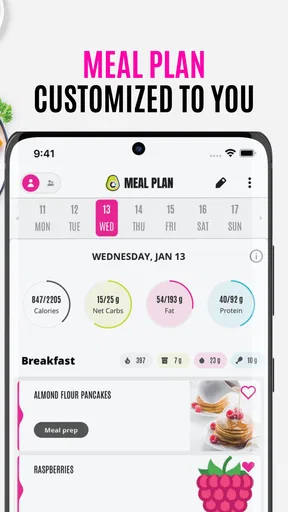
Now, let’s talk features. One of my favorites is the meal planner. It’s like having a personal assistant that helps you keep your meals organized and balanced. You can plan your meals for the week, ensuring you stick to your diet goals without the stress of daily decision-making.
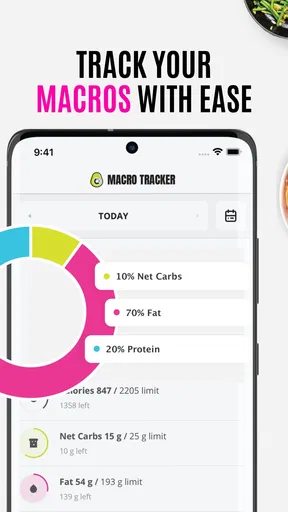
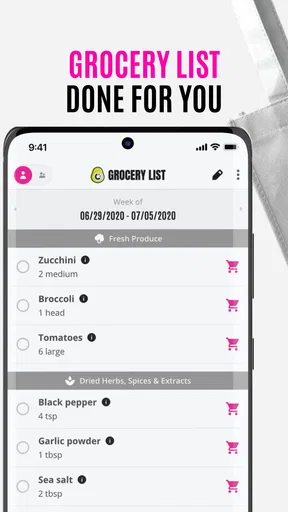
Another cool tool is the grocery list feature. It automatically compiles a shopping list based on the recipes you choose. No more scribbling down ingredients or missing an item at the store. And if you’re worried about macros, the app has you covered with detailed nutritional information for each recipe.
My tip is to plan fewer meals than I think I need at first. A packed schedule can look reassuring on Sunday and become frustrating when plans change midweek. I would start with the meals I am most likely to cook, use the resulting list as a guide, and leave room for leftovers or a flexible night. That also makes the shopping tool more practical: a generated list is a starting point, while a quick check against the pantry can help avoid buying duplicates.
Nutrition information can help compare recipes and understand how a meal fits a personal approach to eating, but I would not treat a number on a recipe as a substitute for individual medical or dietary advice. People managing health conditions, allergies, or specific nutrition targets should still check ingredients carefully and use guidance that fits their needs. The app is most useful when it supports informed choices, not when it is expected to make those choices on someone’s behalf.
How it compares with other ways to plan meals
Compared with saving recipes in a browser or scrolling through social feeds, a dedicated planner has a practical advantage: meal choices can lead into a shopping list instead of disappearing into a collection of bookmarks. Compared with a broad recipe database, Wholesome Yum’s low-carb and keto emphasis gives it a clearer point of view, which can make it easier to find relevant ideas if that is the way I cook. The same focus is a limitation for people who want equal attention to every diet, cuisine, or cooking tradition.
A notebook or basic notes app can still be better for someone who already has a settled rotation of meals and simply wants to record it. Those options are less guided, but they are flexible and do not ask the cook to adopt a recipe app’s approach. I would choose Wholesome Yum when I need fresh low-carb ideas and a connection between recipes, planning, and shopping; I would choose a simpler tool when I only need a place to jot down a few meals.
Community ideas, with room for personal judgement
What’s also neat is the sense of community within the app. There’s a section where users can share their own recipes and modifications. This is a great place to get some inspiration and see how others are making the most out of their low-carb journey. It feels like you’re part of a big, supportive family all striving for healthier living.
Shared variations can be useful when I want to see how another cook adapts a dish, but I would still judge each suggestion by my own ingredients, preferences, and experience. A community contribution is inspiration rather than a guarantee that a substitution will behave exactly the same way in the kitchen. That distinction is worth remembering with baking in particular, where changing ingredients can affect texture as well as taste.
Reliability, device fit, and the final call
I find reliability matters most when a meal plan has already shaped my shopping, so this section looks at practical ways to keep that routine resilient rather than assuming the app will always be available. It also considers how the Android requirement and optional purchases affect the decision to make it a regular kitchen tool, before weighing who is likely to benefit most.
What to expect from regular use
In ordinary use, the app’s quick loading and straightforward layout make it feel suited to short visits throughout the day: checking an idea, reviewing a recipe, or looking over a plan before shopping. I would not confuse that with a promise about performance on every device or network. If a screen takes longer to load, the sensible recovery is to pause, reopen the recipe, and keep a separate note of the meal plan if I am depending on it for a shop. For a routine built around planning, having a simple backup is more dependable than assuming any app will always be available at the exact moment I need it.
The current version is 2.23.6, and the app requires Android 8.0 or later. That makes checking device compatibility worthwhile before relying on it, especially if I use an older phone. The app is free to start, but in-app purchases are available, so I would look at what is included in the free experience before building a routine around any paid option. I would also keep expectations realistic about resource demands: the details that matter most in daily cooking are whether the app opens when needed and whether the recipe and planning flow feels comfortable on my device.
For someone who wants low-carb recipe ideas organized into a practical cooking-and-shopping routine, I think this is a more purposeful choice than a loose pile of saved links. It is less compelling for a cook seeking an all-purpose culinary reference, a strict meal-tracking system, or a tool that can manage every household member’s preferences without compromise. The strongest fit is a person who enjoys cooking but wants less decision fatigue, and who is willing to use the planner as a flexible aid rather than a rigid schedule.
A companion, not a substitute for your own routine
In the end, Wholesome Yum is more than just a recipe app; it’s a companion for anyone on a low-carb or keto diet. It simplifies the cooking process, helps you plan and organize, and even connects you with a community of like-minded folks. If you’re looking to make healthy eating more enjoyable and less of a chore, this app is definitely worth checking out.
So, whether you’re a keto newbie or a seasoned pro, give Wholesome Yum a try. Your tastebuds and waistline will thank you!
Pros
- User-friendly interface for easy navigation.
- Extensive collection of keto-friendly recipes.
- Customizable meal planning features.
- Detailed nutritional information provided.
- Regular updates with new recipes.
Cons
- Limited to keto and low-carb diets only.
- Requires subscription for premium features.
- Occasional app crashes reported by users.
- No option for offline access to recipes.
- Lacks community interaction features.
FAQs for Wholesome Yum
What is Wholesome Yum, and how does it work?
Wholesome Yum is a recipe app focused on providing low-carb, keto-friendly meal ideas. It offers easy-to-follow recipes with detailed nutritional information, helping users maintain a healthy lifestyle. The app also features meal planning tools and a shopping list generator to simplify your cooking experience.
Is Wholesome Yum suitable for beginners in keto dieting?
Yes, Wholesome Yum is designed to be beginner-friendly. It includes a variety of simple recipes with step-by-step instructions. The app also offers educational content to help new users understand the basics of keto dieting, making it easier to start and maintain a low-carb lifestyle.
Does Wholesome Yum require a subscription to access all features?
Wholesome Yum offers both free and premium versions. The free version includes access to a selection of recipes and basic features. To unlock additional recipes, meal planning tools, and personalized features, a subscription to the premium version is required. Pricing details can be found within the app.
Can I customize meal plans in Wholesome Yum?
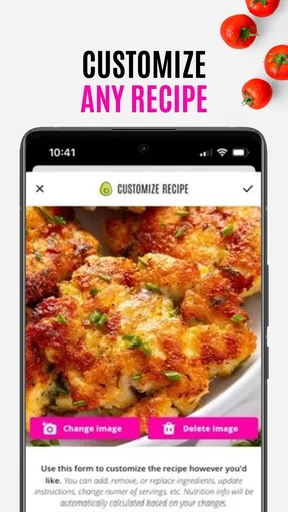
Yes, Wholesome Yum allows users to customize meal plans according to their dietary preferences and goals. The app offers flexible options to adjust serving sizes, switch ingredients, and create personalized meal plans, ensuring that users can tailor their diet to meet specific nutritional needs.
Is Wholesome Yum available on both Android and iOS devices?
Wholesome Yum is available for download on both Android and iOS platforms. Users can find the app on the Google Play Store for Android devices and the Apple App Store for iOS devices. This ensures accessibility and convenience for a wide range of users interested in low-carb cooking.


